Read the date
Compare Gregorian and Chinese lunar dates, year, month and day stems and branches, zodiac signs and seasonal terms. Select a date to explore its daily details.
CELESIGHT CALENDAR
Solar and lunar dates, seasonal knowledge, local sky views and the days you want to remember.

天象万年历
Developed by Suzhou Dongxuan Cultural Communication Co., Ltd., Celesight Calendar brings familiar calendar information and Chinese astronomical culture into a practical mobile interface.
The domestic version is being prepared for public release. No App Store release is currently announced.
Read the usage guide ↗天象万年历九月初五
2026年10月14日 · 星期三戊戌月 辛酉日嫁娶 祭祀 祈福 求嗣 动土
开光 栽种
Compare Gregorian and Chinese lunar dates, year, month and day stems and branches, zodiac signs and seasonal terms. Select a date to explore its daily details.
Choose a city and time to explore the meridian or full-sky view, seven traditional luminaries, Chinese star groups, lunar phases and rise/set times.
Record anniversaries and birthdays using the solar or Chinese lunar calendar, with repeat rules and local notifications.
LOCAL SKY VIEW
The sky view changes with the selected city and observation time. Names and positions connect astronomical calculation with traditional Chinese star groups.
Calculated example: Beijing, 14 October 2026, 20:00 local time.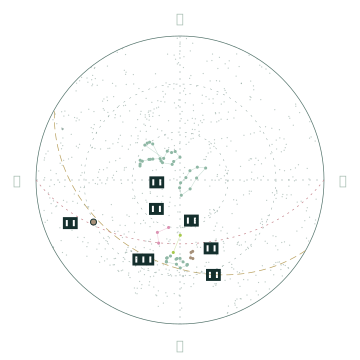
Basic calendar functions, almanac information and local reminders can be used without signing in. Protected sky features require a valid account entitlement. Account activation and refresh need an internet connection; a valid device licence supports offline use for up to seven days.
Domestic account services and public distribution are subject to deployment and release arrangements.
Find guidance on selecting dates, changing the observation city, adjusting the sky clock, managing reminders and checking updates.
Open the support guide ↗